
Control LiveText
Update over UDP
Section titled “Update over UDP”LEDVIZ receives LiveText data on a continuously open UDP port. Each message starts with # followed by the tag name. A pipe character | separates the name from the new content.
#TAG1|Hello world!| Setting | Value |
|---|---|
| Protocol | UDP |
| Port | 28077 |
| Character encoding | UTF-8 |
| Message format | #TAGNAME|Text |
A received LiveText value is forwarded directly to the output, and the layer updates immediately. You can change the content repeatedly while it is being displayed.
Enter text through the LEDVIZ Operational Hub
Section titled “Enter text through the LEDVIZ Operational Hub”The LEDVIZ Operational Hub makes LEDVIZ functions available as a web page. On the LEDVIZ computer, open the Operational Hub.
To connect from another computer, replace localhost with the LEDVIZ computer’s hostname or IP address. Keep port 19399.
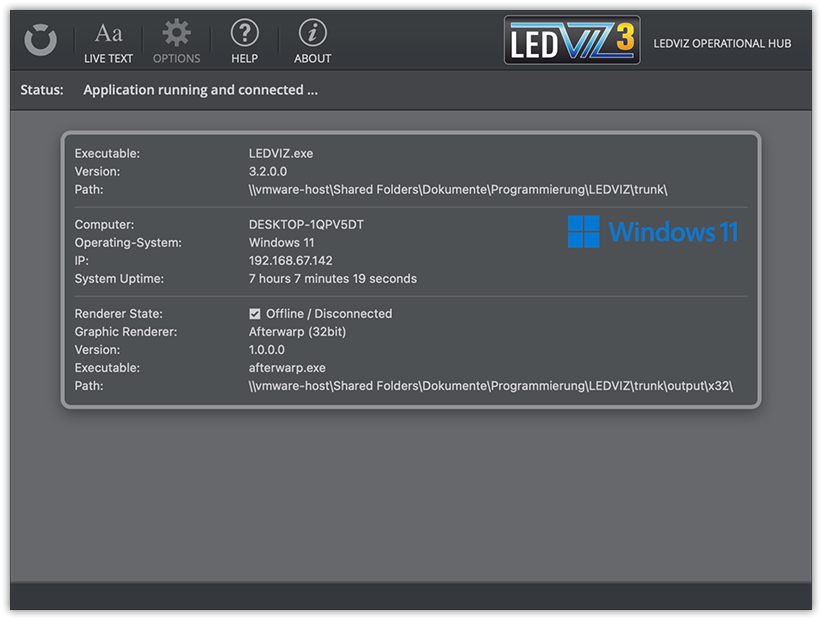
- Open the menu at the top left.
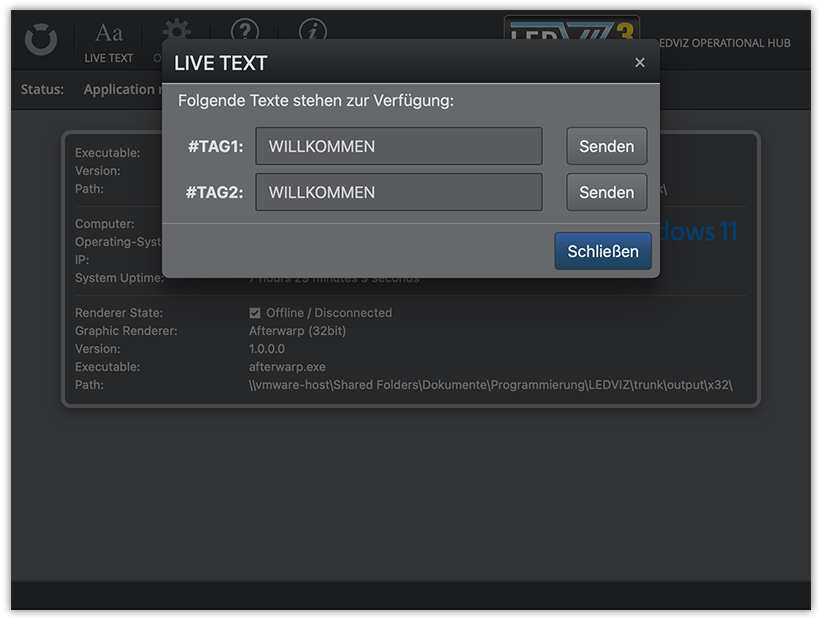
- Open the text-entry dialog.
- Choose a tag from the current project.
- Enter and send the text.
Only tags contained in the current project appear in this dialog.
Test utility
Section titled “Test utility”Download the LEDVIZlive test utility. It was originally developed to display betting odds for a training match between 1. FC Köln and Watford FC.
It uses these tags:
#QUOTE-WIN-FCK#QUOTE-WIN-WTF#QUOTE-TOR-FCK#QUOTE-TOR-WTFThis reference is based on the existing LEDVIZ documentation. Some screenshots show an earlier application interface. Original documentation